Workflows
A workflow is a long-running business process written in plain Java or Kotlin with the Axoniq workflow engine. It runs steps, waits for events and timers, and picks up where it left off after a restart. Axoniq Platform shows every workflow your applications run: how many start, complete and fail, which executions are running now, and how a single execution went, step by step.
To start writing workflows, follow the workflow getting started guide.
Requirements
Workflows show up in Axoniq Platform when the application:
-
runs Axoniq Framework 5.4 or later with the workflow engine (
io.axoniq.framework:axoniq-workflow-dsl, oraxoniq-workflow-dsl-kotlinfor Kotlin, versions managed by the Axoniq Framework BOM); -
uses Axoniq Platform client 5.4.4 or later, set up as described in Axon Framework Connector.
No extra configuration is needed. The client detects the workflow engine on the classpath and starts reporting on its own. Workflows are included in every plan, Community included.
The Workflows item in the environment menu is always there. Until an application in the environment runs a workflow, the page shows an introduction with an example diagram.
What the client reports
The client reports two kinds of data, and Axoniq Platform reads a third on demand.
- Definitions
-
When it connects, each node reports the workflows its code defines. The client reads the steps from the compiled definition and draws a BPMN diagram from them, so you do not maintain a diagram by hand. Axoniq Platform keeps the definitions while the node is connected, so it does not ask the application for them again.
- Counters
-
With the other metrics, each node reports how many workflows and steps started, completed, failed, were cancelled or timed out, how many are open, and how long steps took. The counters are totals since the node started counting, so a report that does not arrive does not lose counts: the next one carries them. Axoniq Platform keeps them for 30 days.
- Executions
-
The list of executions and the history of a single execution stay in your application. Axoniq Platform asks a node of the application for them while you look at them, and stops asking when you leave the page or switch to another browser tab. The client builds the list from the events the workflow engine stores, keeps it in memory, and stores a snapshot every 5 minutes, so a restart does not read the whole event store again.
The overview
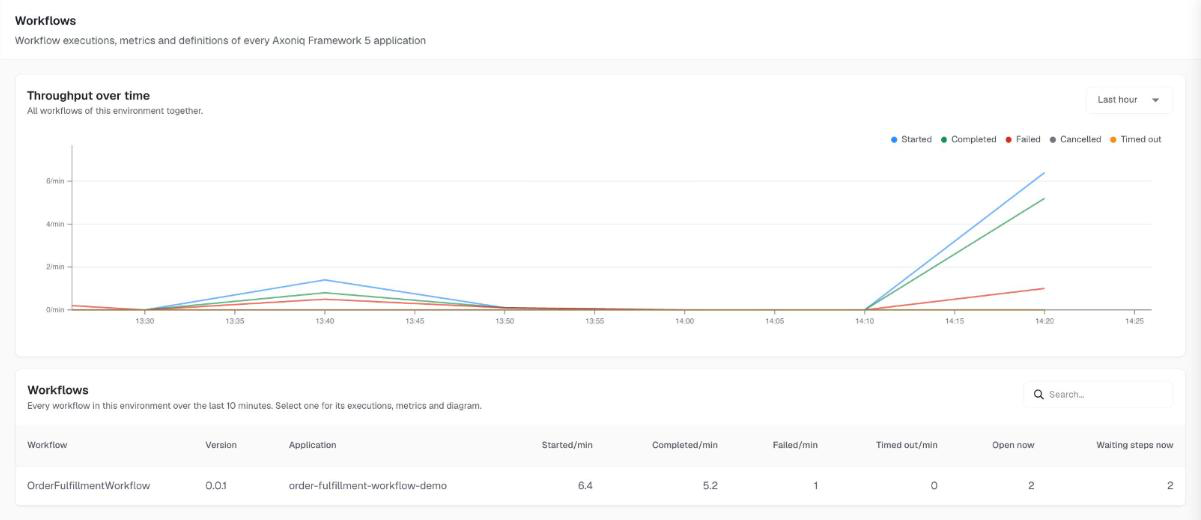
The overview lists every workflow in the environment over the last 10 minutes, per application and version: started, completed, failed and timed out per minute, the executions open now, and the steps waiting now. Above the table, a graph shows the throughput of all workflows together over the last hour, day, 7 days or 30 days.
Select a workflow to open its page. The executions fill the page, and Metrics and Definitions in its header open as dialogs over them. The same views are on the Workflows tab of an application, for every workflow of that application.
Executions
The executions view lists the executions of the selected workflow, newest first. You can search by execution ID and filter by status: running, completed, failed, cancelled or timed out. The list refreshes every few seconds while it is on screen.
Select an execution to see its history. The header shows when it started, how long it ran, the steps it completed, the time it spent waiting and the events it recorded. Below the header, four tabs show the history:
- Waterfall
-
Every step on a timeline, with its start, duration, retries and waits.
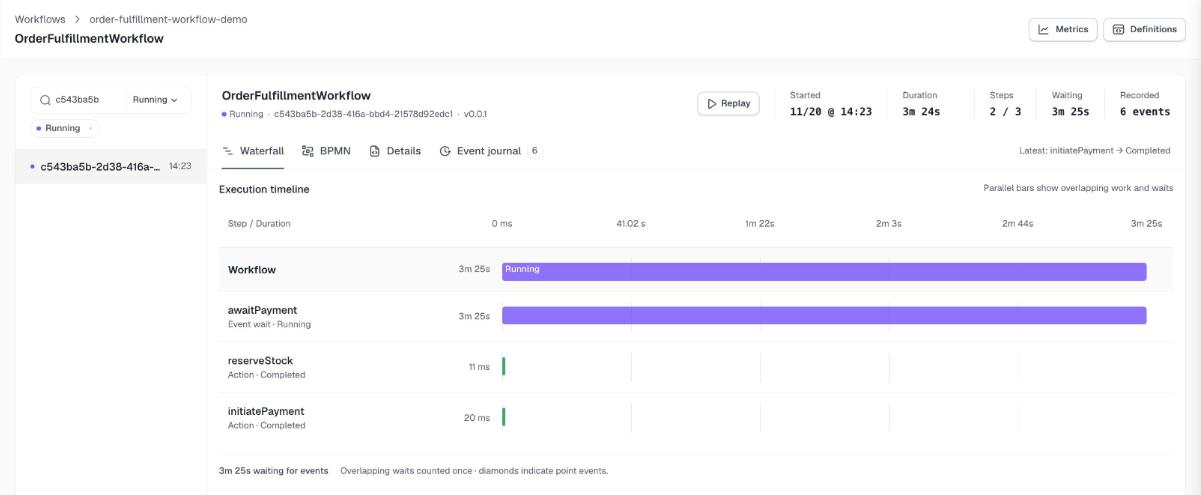 Figure 2. A running execution on the Waterfall tab, waiting for a payment
- BPMN
-
The BPMN diagram of the workflow, with the steps this execution passed coloured by their outcome and the branches it did not take marked "Not taken".
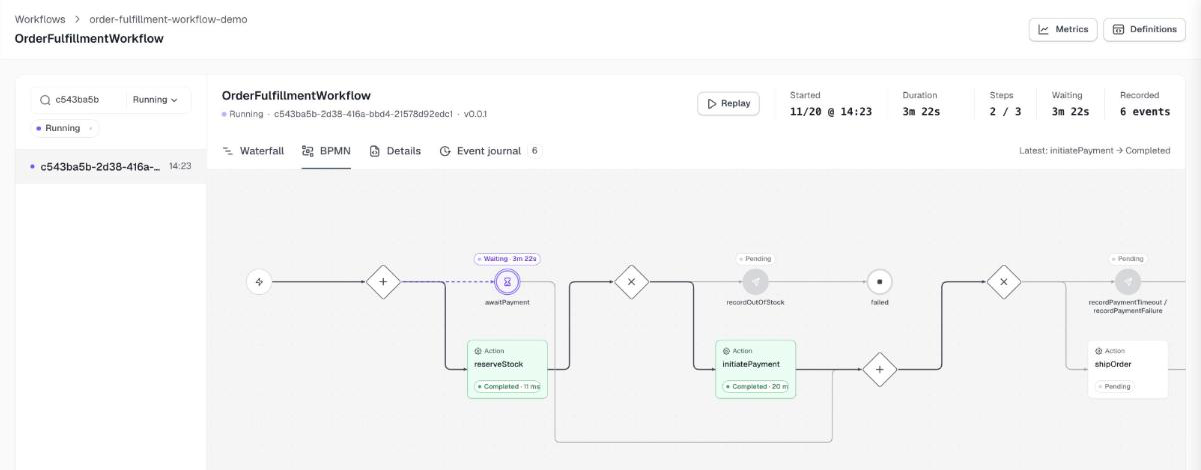 Figure 3. The same execution on the BPMN tab
- Details
-
The lifecycle events of the workflow itself, with the payloads it received and produced.
- Event journal
-
Every event the workflow engine stored for this execution, in order.
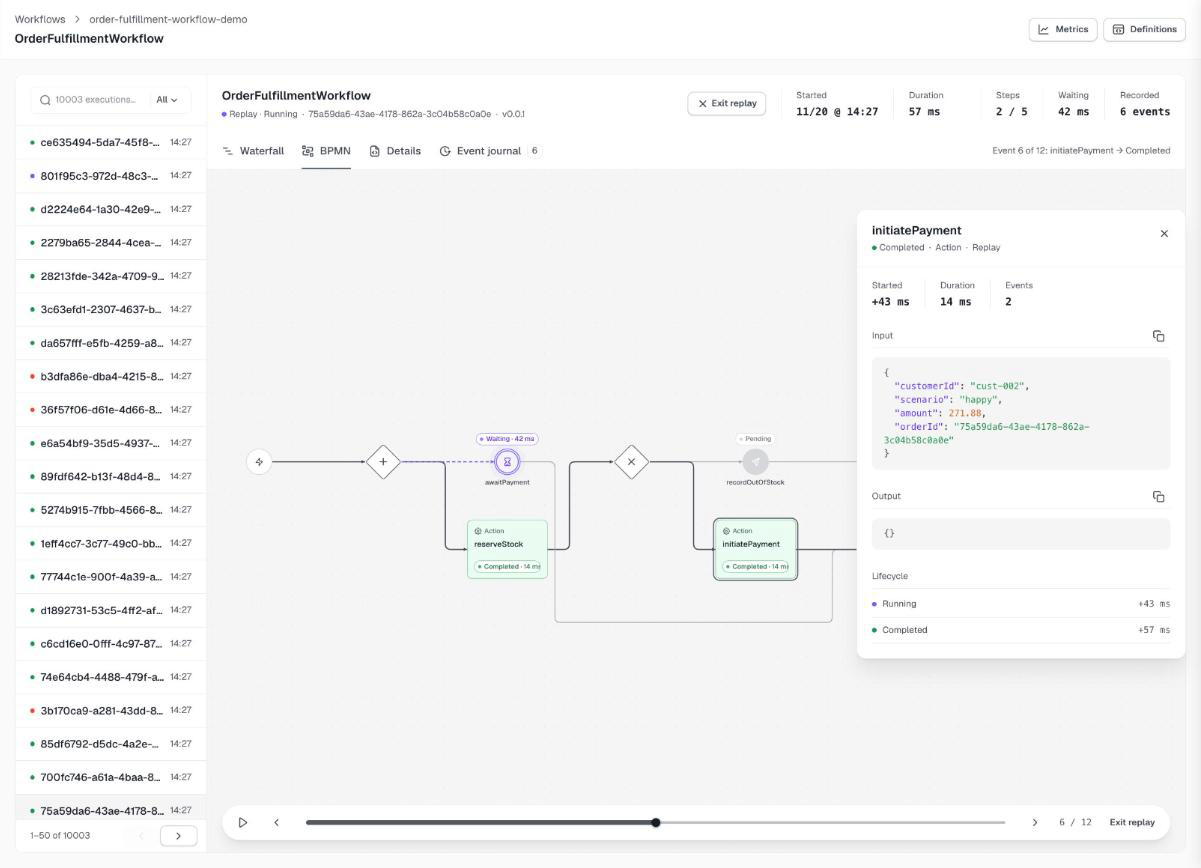
Replay in the header steps through the history one event at a time, on the waterfall and the diagram together. Exit replay returns to the execution as it is now. Select a step on the waterfall or the diagram to open its lifecycle events and payloads in a side panel.
A running execution refreshes every 2 seconds until it ends. A finished execution no longer changes and is not read again.
Payloads
The client sends event payloads only when the application allows Axoniq Platform to see them, the same as for entity inspection.
Set axoniq.platform.domain-event-access-mode to FULL or PREVIEW_PAYLOAD_ONLY to show them.
With the default NONE, the history shows the events without their payloads.
Payloads larger than 16 KB are left out.
How long executions stay listed
Running executions are always listed. Finished executions stay listed for 30 days, and at most 10,000 at a time, the oldest going first. You can change both in the client:
axoniq.platform.workflow.retention=P30D
axoniq.platform.workflow.max-finished-executions=10000
The counters in the overview and the metrics are not affected by these settings.
Metrics
The metrics view shows the counters of the selected workflow over the last 10 minutes, hour, day, 7 days or 30 days: started, completed, failed, cancelled and timed out per minute, and the executions open and steps waiting now.
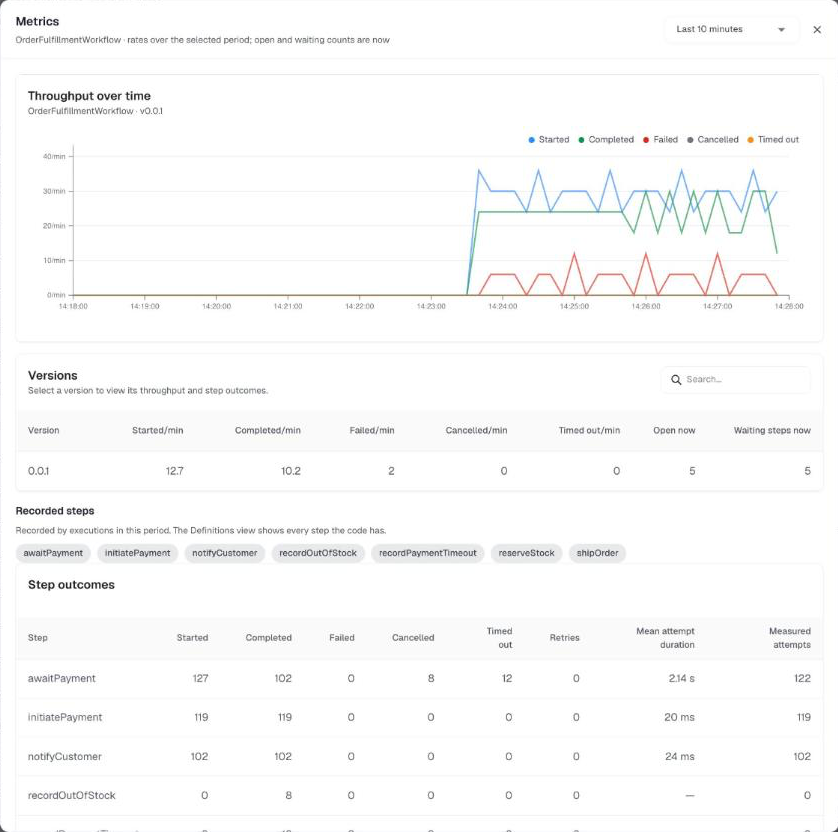
Per step, it shows how many attempts started, completed, failed, were cancelled or timed out, how many were retries, and the mean attempt duration. The duration includes the waiting time of a step that waits for an event or a timer, and excludes the backoff between retries.
Longer ranges are read at a coarser resolution, so a burst can be split across two points of the graph. The totals stay exact.
Definitions
The definitions view shows each workflow version with its BPMN diagram and the nodes that run it.
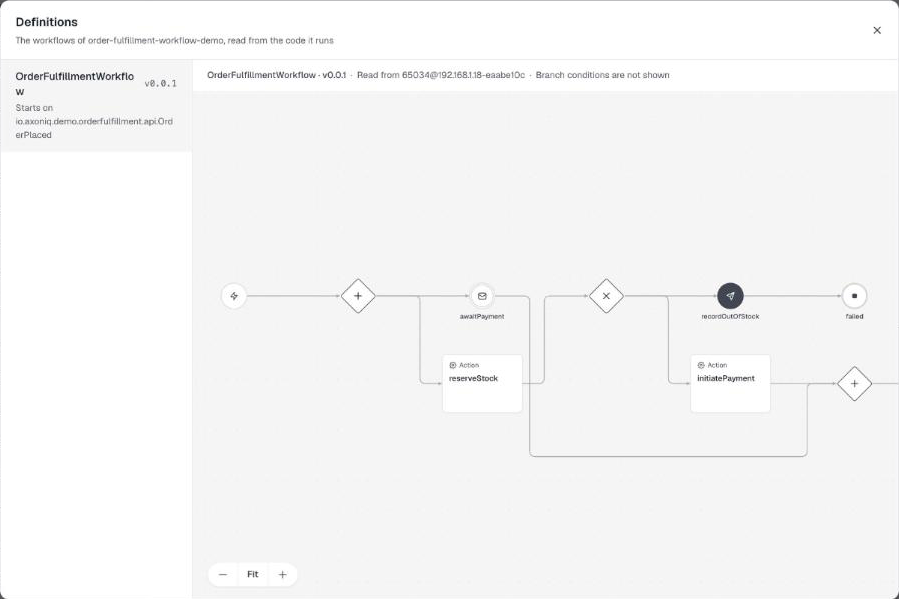
Axoniq Platform warns you in two cases:
-
Nodes run different steps for one version. This happens during a rolling deployment that changed a workflow without a new version. An execution that resumes on a node whose steps differ from the ones it recorded fails replay, unless the change goes through
migrateVersionor a new workflow version. -
A node has not reported its definitions yet. Its code is left out until it does.
When the client cannot read the steps of a definition, the definition is listed without a diagram, with the reason.