Exceptions
A rule usually describes what is normal for most of your system. Exceptions handle the rest: the processor that calls a slow legacy system, the test environment where nobody needs to be woken up, the handler that is allowed a higher error rate.
An exception belongs to one condition of a rule. It applies to one subject, to one or more environments, or to one subject in specific environments, and either:
-
replaces the condition’s threshold, and optionally its comparison, percentile and severity, or
-
switches the condition off for what it covers: never alert.
The rule’s other conditions keep judging the subject as before.
In the rule editor
Under a condition, click + Add exception and choose:
-
Which subject: a specific subject, picked from the subjects the Platform knows, or Every subject, for example Every aggregate.
-
Where: the environments the exception applies to.
-
How it is judged: a comparison and threshold, or never alert.
-
The severity, or Same as condition.
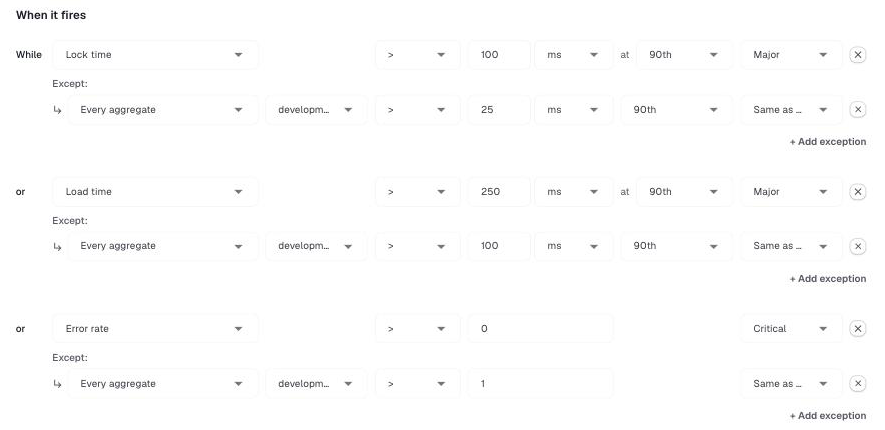
The example above tightens the default thresholds of the Bad performing aggregate rule for every aggregate in the development environment.
Some common uses:
| You want to | Add an exception for |
|---|---|
Use a higher latency threshold for one processor |
that processor, in all environments, with the higher threshold |
Not get alerts from a test environment |
every subject, in the test environment, with never alert |
Treat a problem in production as more severe |
every subject, in production, with the same threshold and a higher severity |
Ignore one known-noisy handler |
that handler, with never alert |
A warning icon appears next to an exception whose subject no longer exists, for example after a processor was renamed. The exception does no harm, but you can remove it.
From the inbox
When an alert fires for a subject that should be judged differently, you can add an exception without leaving the inbox. Select the subject in the inbox item and click Create exception.
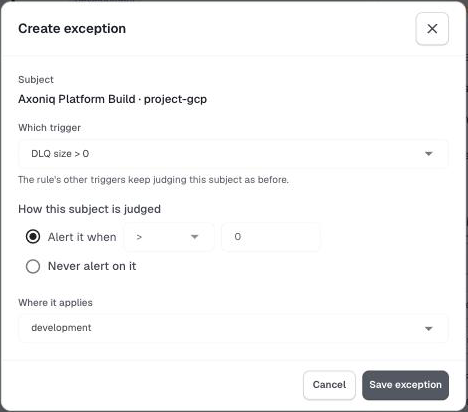
Choose which condition of the rule (Which trigger) the exception is for, how the subject should be judged, and where it applies. The environment of the inbox item is selected by default. The exception is added to the rule and takes effect from the next check, about a minute later.
Which exception applies
When several exceptions could apply, the Platform decides as follows:
-
Exceptions for every subject in an environment are considered first. One that says never alert switches the condition off in that environment entirely.
-
Exceptions for a specific subject are considered next, and win over exceptions for every subject.
-
An exception for a named environment wins over one for all environments.
Two exceptions that cover exactly the same subject and environment are not allowed; the editor asks you to merge them.
The editor also rejects exceptions that could never be used, such as an exception for an environment the rule does not apply to, or for a subject that the rule’s filters exclude.