Node Restarts and Replacement in a Managed Cluster
When Axoniq Platform manages your Axon Server cluster, it decides how a node joins the cluster when it boots. This page explains what Axoniq Platform does when a node goes down, comes back, or is replaced, so you can plan maintenance and disaster recovery safely.
In short: a node that comes back with its data intact rejoins the cluster through Axon Server replication alone, and Axoniq Platform only matters when a node starts without any cluster configuration of its own.
How Axoniq Platform tracks membership
Axoniq Platform keeps a list of the nodes that belong to each cluster. A node becomes a member the first time it registers, and it keeps its membership when it disconnects. Axoniq Platform identifies a node by its node name, so a node that comes back under the same name takes back its own place.
Every time a node registers, Axoniq Platform returns the cluster configuration. This configuration lists the members that are online at that moment, ordered by when each node first joined the cluster. Members that are offline are left out, so a node that has been gone for a long time can never block the others.
What a node does when it boots
On every boot, the node registers with Axoniq Platform and then decides what to do with the configuration it receives:
-
If the node already has cluster configuration of its own, for example replication groups on its data volume, it does nothing more. It starts as a regular member and catches up with the current leader through replication.
-
If the node has no cluster configuration and it is first in the list, it initializes a new cluster.
-
If the node has no cluster configuration and it is not first, it joins the first other node in the list.
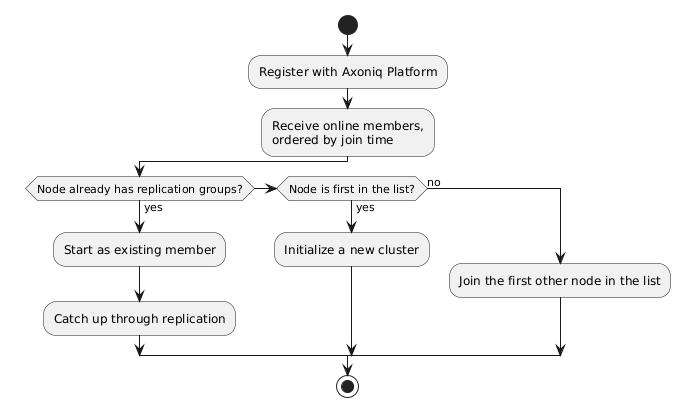
The order of the list therefore only affects nodes that boot without cluster configuration. That is the case when a cluster is first created, and also later whenever a node starts on an empty volume.
A node goes down and comes back
When a node goes down, Axoniq Platform records when it was last seen and keeps it as a member. Nodes that register in the meantime receive a configuration without it.
When the node comes back under the same name and with its data volume intact, Axoniq Platform updates the node’s addresses and keeps its original place in the list. The node already has its cluster configuration, so it rejoins the cluster and catches up through replication, exactly as it would without Axoniq Platform. How long the node was down makes no difference.
The same applies to a node whose volume you restored from a snapshot: the snapshot contains the node’s cluster configuration, so the node starts as an existing member. You do not need to wait for any other node to be initialized first.
Situations that need attention
A node starts on an empty volume under its old name
A node that lost its data but keeps its name still holds its original place in the list. If no member that joined earlier is online at that moment, the node is first in the list, and it initializes a new, separate cluster instead of joining the existing one. This happens, for example, when the first node of the cluster comes back with an empty volume, or when the second node does while the first node is down.
The result is two clusters that both consider themselves authoritative. To replace a node whose data is lost, follow the procedure in Replacing a node whose data is lost instead of starting it on an empty volume.
A node is evicted while it is offline
The number of members is limited by the number of nodes in your subscription. When the cluster is at that limit and a node with a new name registers, Axoniq Platform frees a place by removing the member that has been offline the longest. A member that is online is never removed.
If the removed node comes back later, Axoniq Platform treats it as a new node. When every place is taken by an online member, its registration is refused and the node keeps retrying. To avoid this, keep node names stable when you replace an instance, and do not start extra nodes under new names while a member is offline.
No other member is online
A new node, one that has never been a member, is refused when all existing members of the cluster are offline. This prevents it from initializing a second cluster that conflicts with the original nodes when they return. Bring at least one existing member back online first, or deregister the offline members if they are gone for good.
Replacing a node whose data is lost
Axoniq Platform does not change the replication groups of your cluster. Removing a node from the cluster itself is done with the Axon Server CLI or admin API, against a node that is still online. Axoniq Platform only stores which nodes it considers members, and uses that list to tell a booting node what to do.
To replace a node that lost its data volume, while a majority of the cluster is still healthy:
-
Make sure the failed node is stopped.
-
Remove the node from its replication groups, and unregister it from the cluster, using the Axon Server CLI against a node that is online.
-
In Axoniq Platform, go to the Axon Server page of your environment, open the menu of the node and choose Deregister Node. This is only possible while the node is offline.
-
Start the replacement node with an empty volume.
Because the node was deregistered, Axoniq Platform admits it as a new member at the end of the list. The replacement then joins one of the online nodes and receives a full copy of the data through replication. For a large event store this can take a while, and until it completes, your cluster has less redundancy than usual.
|
If your data volume is intact, or you can restore the node’s own volume from a recent snapshot, you do not need this procedure. Start the node with its original name and volume, and it catches up from the leader. |