Axon Framework 4 LTS Repository
Axon Framework 4 Long Term Support (LTS) releases bring security and bug fixes to Axon Framework 4 after its open-source support window has ended. They are distributed from a private Maven repository in Axoniq Platform.
Access to the repository is part of the Enterprise plan. Workspaces without it see a Contact sales option on the Long Term Support page instead of the setup instructions.
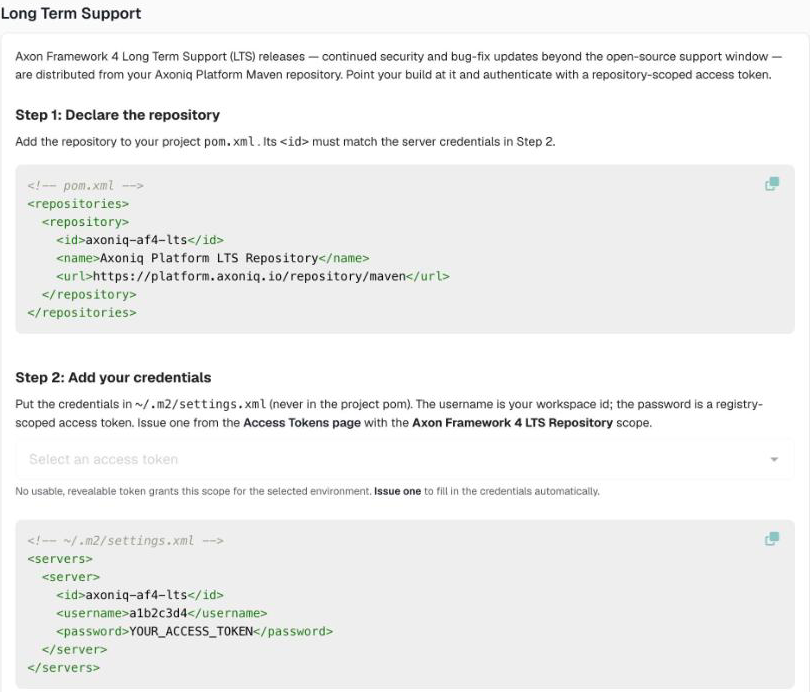
The setup instructions, with your workspace ID filled in, are in the Resource Center: open Resource Center in the sidebar and click Repository setup under Support.
Step 1: Issue an access token
Issue an access token with the Axon Framework 4 LTS Repository scope, or All repositories. Repository scopes are valid for the whole workspace, so you do not choose environments for them.
For a build server, issue a separate token so you can rotate or revoke it without affecting anything else.
Step 2: Declare the repository
Add the repository to the pom.xml of your project:
<repositories>
  <repository>
    <id>axoniq-af4-lts</id>
    <name>Axoniq Platform LTS Repository</name>
    <url>https://platform.axoniq.io/repository/maven</url>
  </repository>
</repositories>
The repository only serves Axoniq LTS artifacts. All other dependencies, including the open-source Axon Framework releases, still come from Maven Central.
Step 3: Add your credentials
Add the credentials to your Maven settings.xml, usually ~/.m2/settings.xml.
Keep them out of the project pom.xml, so they do not end up in version control.
<servers>
  <server>
    <id>axoniq-af4-lts</id>
    <username>WORKSPACE_ID</username>
    <password>ACCESS_TOKEN</password>
  </server>
</servers>-
The
idmust match theidof the repository in Step 2. -
The username is the ID of your workspace, not of an environment.
-
The password is the secret of the access token from Step 1.
In the Resource Center you can pick a token to fill in the secret. That is recorded in the token’s access log.
Step 4: Use an LTS version
Set the Axon Framework version, or the version of the Axon Framework BOM, to an LTS release. The Long Term Support page lists the LTS releases and their release notes.
If Maven reports 401 Unauthorized for the repository, check that the token has not expired or been revoked, has a repository scope, and that the username is the workspace ID.