Modules
Axon Framework consists of a number of modules that provide specific capabilities. Depending on the exact needs of your project, you will need to include one or more of these modules.
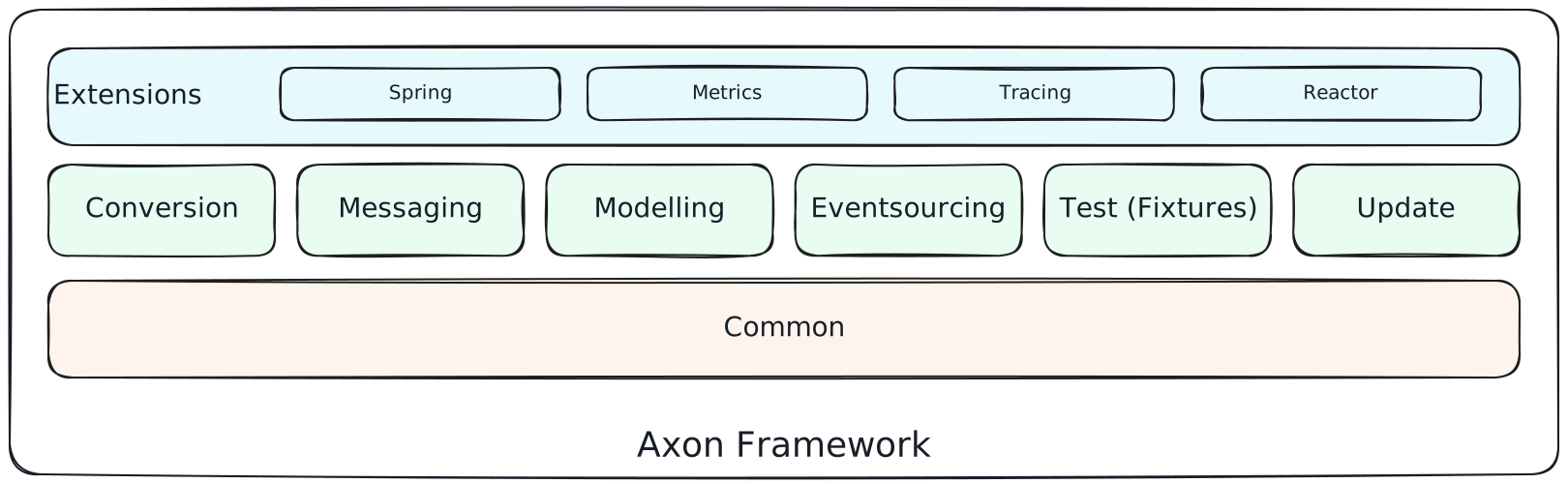
There are currently two ways of obtaining the module binaries: either download the binaries from our website or preferably configure a repository for your build system (Maven, Gradle).
To not be bothered with version compatibility issues between framework and the extensions, it is recommended to use the BOM.
Axon modules are available on Maven Central.
Main modules
Axon 'Main Modules' are the modules that have been thoroughly tested and are robust enough to use in demanding production environments.
The maven groupId of all these modules is org.axonframework.
Visit Maven Central Repository to copy coordinates for the version you need.
Quick start an Axon Application
The Axon Spring Boot Starter extension is the quickest start in to an Axon project as it will retrieve all the required modules/dependencies transitively. See the Extension modules section below for details. Alternatively, you can manually select individual modules for a customized configuration.
| Module | Artifact Id | Group Id | Maven Central |
|---|---|---|---|
|
|
||
|
|
||
|
|
||
|
|
||
|
|
||
|
|
||
|
|
Axon Common
This module contains all common components utilized by Axon Framework throughout. Examples of what is container are Axon’s caching integration, configuration implementation, application descriptors, and numerous utility classes.
Axon Conversion
This module provides the conversion interfaces and implementations, used to (for example) convert every Message#payload when sending and receiving them.
Axon Messaging
This module contains all necessary components and building blocks to support command, event, and query messaging.
Axon Event Sourcing
This module contains all necessary infrastructure components to support Event Sourcing, Command Models, and Query Models.
Axon Test
This module contains test fixtures that you can use to test Axon based components, such as your command handlers and entities. You typically do not need this module at runtime and will only need to be added to the classpath for running tests.
Axon Update
This module Axon Framework’s update checker, ensuring your Axon application is as up to date as possible. For more details on this component we refer to this section of our documentation.
Extension modules
Besides main modules, there are several extension modules which complement Axon Framework.
The maven groupId of these extensions starts with org.axonframework.extensions.*.
Visit Maven Central Repository to copy coordinates for the version you need.
These extensions are part of the main Axon Framework repository and provide essential integration and monitoring capabilities.
| Module | Artifact Id | Group Id | Maven Central |
|---|---|---|---|
|
|
||
|
|
||
|
|
||
|
|
||
|
|
||
|
|
Axon Spring
This extension allows Axon Framework components to be configured in the Spring application context. It provides integration with Spring Framework, enabling bean-based registration and lifecycle management of Axon components.
Axon Spring Boot Starter
This extension provides Spring Boot auto-configuration for your project. It is by far the easiest option to get started as it automatically configures all Axon components. It is explained in more details here.
Axon Reactor
This extension provides reactive gateways for Axon Framework’s command, event, and query buses using Project Reactor.
It includes ReactorCommandGateway, ReactorEventGateway, and ReactorQueryGateway, the reactor counterparts to Axon’s standard gateways that return Mono and Flux instead of CompletableFuture.
The key feature is that reactive dispatch interceptors run inside the Reactor subscription chain.
This gives interceptors access to the Reactor context, enabling integration with reactive context holders such as Spring Security’s ReactiveSecurityContextHolder.
This is particularly useful in Spring WebFlux applications where thread-local context holders are not available.
The reactive gateways are auto-configured when the axon-reactor extension is on the classpath.
In Spring Boot applications, reactor dispatch interceptors declared as Spring beans are automatically discovered and registered.
To add the extension to your project:
-
Maven
-
Gradle
<dependency>
    <groupId>org.axonframework.extensions.reactor</groupId>
    <artifactId>axon-reactor</artifactId>
    <version>${axon.version}</version>
</dependency>
implementation 'org.axonframework.extensions.reactor:axon-reactor:${axonVersion}'Axon Dropwizard metrics
This extension provides basic implementations based on Dropwizard to collect monitoring information.
Axon Micrometer metrics
This extension provides basic implementations based on Micrometer to collect monitoring information. Micrometer is a dimensional-first metrics collection facade whose aim is to allow you to time, count, and gauge your code with a vendor neutral API.
Axon Kotlin
The Kotlin extension provides idiomatic Kotlin support for Axon Framework, reducing boilerplate and enabling natural Kotlin API usage through extension functions and reified generics.
Features include, among others:
-
reified generics support to eliminate explicit type parameters
-
idiomatic extension functions for messaging gateways and metadata
-
Kotlin value class support for entity identifiers
-
Kotlin nullable types honored for injected entities, so
MyEntity?needs no@Nullableannotation -
reduced boilerplate in event sourcing handlers
-
test fixture support tailored for Kotlin (
axon-kotlin-test)
Axoniq Framework modules
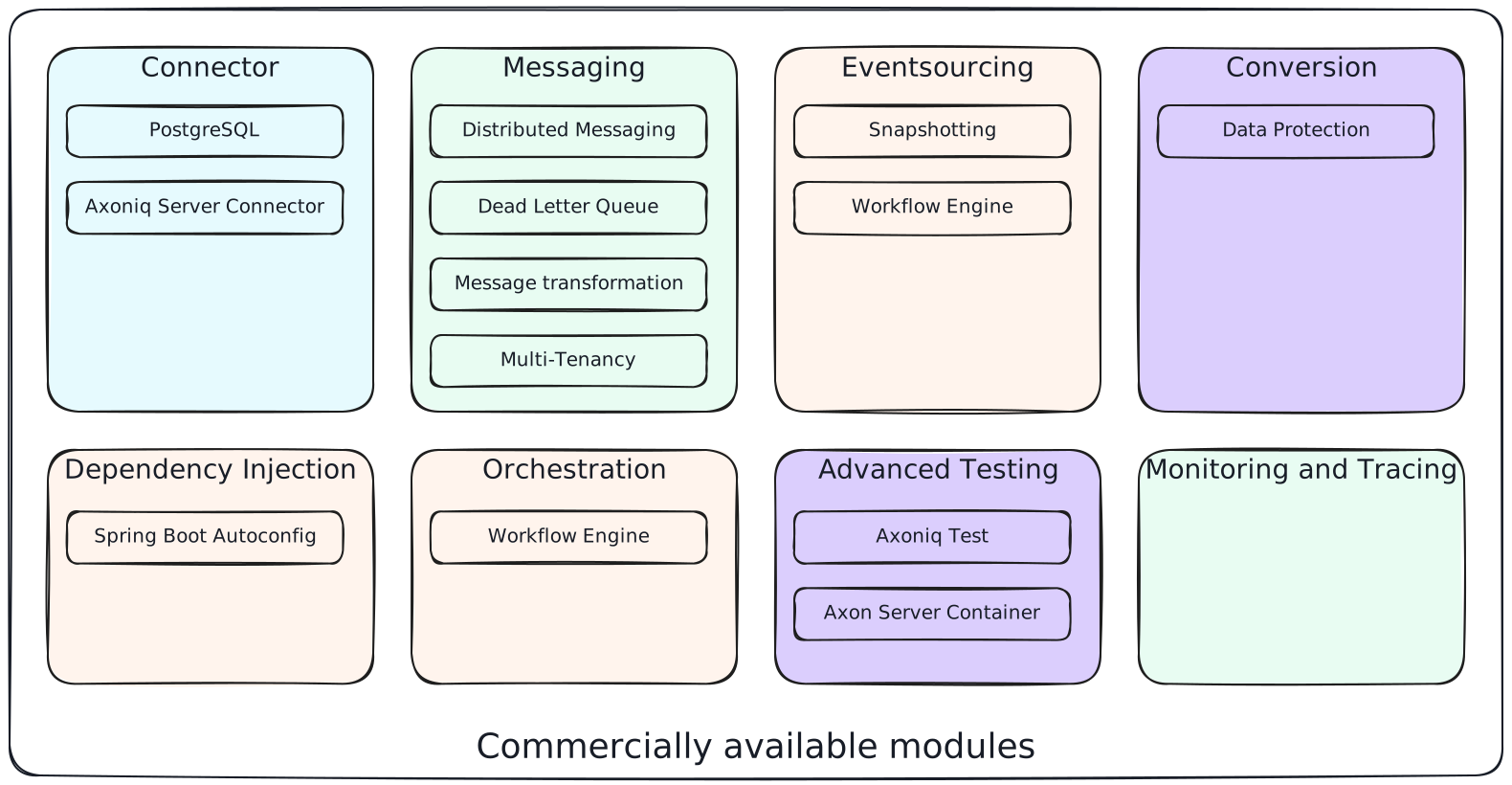
Besides the open source Axon Framework, Axoniq provides the Axoniq Framework advanced features which are available for production use with a commercial license.
Depending on the exact needs of your project, you will need to include one or more of these modules.
| Module | Artifact Id | Group Id | Maven Central |
|---|---|---|---|
|
|
||
|
|
||
|
|
||
|
|
||
|
|
||
|
|
||
|
|
||
|
|
||
|
|
||
|
|
Axoniq PostgreSQL
This module provides a storage solution optimized for use with PostgreSQL by taking advantage of PostgreSQL-specifics. It supports the Dynamic-Consistency Boundary, just as Axon Server does
Axoniq Axon Server connector
This module provides infrastructure components that connect to Axon Server.
Axoniq distributed messaging
This module provides distributed variants for messaging components (namely CommandBus and QueryBus).
Axoniq message transformation
This module rewrites stored events as they are read, so handlers always receive the current version. It is the Axoniq Framework replacement for Axon Framework 4 upcasting. See the event transformation reference to get started.
Axoniq connector for Spring Cloud
This module distributes commands and queries between application instances over HTTP, using a Spring Cloud DiscoveryClient to find them, without an Axon Server in between.
Spring Boot applications depend on axoniq-springcloud, which brings the connector and the servlet web stack it serves its endpoints on, and axoniq-spring-boot-starter which provides the autoconfiguration.
Axoniq multi-tenancy
This module lets a single application instance serve multiple tenants, separating tenant data in transit and at rest by mapping each tenant to a dedicated Axon Server context. See the multi-tenancy reference to get started.
Axoniq tracing OpenTelemetry
This extension contains the components needed to enable tracing with OpenTelemetry.
Axoniq Workflow Engine
This module provides the Axoniq Workflow Engine, which allows users to express complex, long-running business processes in simple, imperative code.
Axoniq Data Protection
This module provides cryptographic data protection and GDPR compliance for event-sourced applications through field-level encryption and key management.
Axon Framework Bill of Materials
In addition to the Axon Framework modules and extensions and Axoniq Framework modules, Axon also provides two Bills of Materials, or BOM for both Axon Framework and Axoniq Framework. The BOM is provided to ensure the use of compatible framework and extension dependencies inside an Axon application. As such, it is the recommended approach towards defining the overall Axon version used inside of an application.
Axon Framework Bill of Materials
For the Axon Framework and extensions, we provide a BOM under the org.axonframework Group id as follows:
| Module | Artifact Id | Group Id | Maven Central |
|---|---|---|---|
|
|
For using the BOM, you would add the axon-bom dependency to your dependency management system:
-
Maven
-
Gradle
<!--...-->
<dependencyManagement>
    <dependencies>
        <dependency>
            <groupId>org.axonframework</groupId>
            <artifactId>axon-framework-bom</artifactId>
            <version>${version.axon}</version>
            <type>pom</type>
            <scope>import</scope>
        </dependency>

        ...

    </dependencies>
</dependencyManagement>
<!--...-->
For usage with Gradle Version 4.x and below, apply the dependency-management-plugin like so:
buildscript {
  repositories {
    jcenter()
  }
  dependencies {
    classpath "io.spring.gradle:dependency-management-plugin:0.5.1.RELEASE"
  }
}

apply plugin: "io.spring.dependency-management"
After this, import the Axon BOM:
dependencyManagement {
  imports {
    mavenBom 'org.axonframework:axon-framework-bom:<VERSION>'
  }
}
Beginning with Gradle version 5.0, you can also omit the dependency-management plugin and instead use the platform dependency DSL to import maven BOMs:
implementation(platform("org.axonframework:axon-bom:<VERSION>"))
After that is in place, you can add any of the mentioned dependencies from framework and the extensions without specifying versions. Furthermore, you will be guaranteed that the provided versions in the BOM are compatible with one another.
Axoniq Framework Bill of Materials
For the Axoniq Framework, we provide a BOM under the io.axoniq.framework Group id as follows:
| Module | Artifact Id | Group Id | Maven Central |
|---|---|---|---|
|
|
For using the BOM, you would add the axoniq-framework-bom dependency to your dependency management system:
-
Maven
-
Gradle
<!--...-->
<dependencyManagement>
    <dependencies>
        <dependency>
            <groupId>io.axoniq.framework</groupId>
            <artifactId>axoniq-framework-bom</artifactId>
            <version>${version.axon}</version>
            <type>pom</type>
            <scope>import</scope>
        </dependency>

        ...

    </dependencies>
</dependencyManagement>
<!--...-->
For usage with Gradle Version 4.x and below, apply the dependency-management-plugin like so:
buildscript {
  repositories {
    jcenter()
  }
  dependencies {
    classpath "io.spring.gradle:dependency-management-plugin:0.5.1.RELEASE"
  }
}

apply plugin: "io.spring.dependency-management"
After this, import the Axon BOM:
dependencyManagement {
  imports {
    mavenBom 'io.axoniq.framework:axoniq-framework-bom:<VERSION>'
  }
}
Beginning with Gradle version 5.0, you can also omit the dependency-management plugin and instead use the platform dependency DSL to import maven BOMs:
implementation(platform("io.axoniq.framework:axoniq-framework-bom:<VERSION>"))
After that is in place, you can add any of the mentioned dependencies from the advanced modules without specifying versions. Furthermore, you will be guaranteed that the provided versions in the BOM are compatible with one another.
|
The Axoniq Framework BOM includes all dependencies for the Axon Framework modules and the Axon Framework extension modules, so whenever you use the Axoniq Framework BOM you do not need to additionally include the Axon Framework BOM. |